Technology News: Mobile Tips
Showing posts with label Mobile Tips. Show all posts

Tuesday, 27 September 2011

Manage iPhone and iPod easily with iPhone Explorer

Transferring data in iPhone and iPod without iTunes is a big problem. Major problem of iTunes is that when we transfer the data in iPhone then previous data is removed from the iPhone. Without iTunes we cannot update our iPhone.

But now you can manage iPhone and iPod is easy even without need for installing iTunes. You can transfer files in any format to and from the iPhone easily with this software called iPhone Explorer. With this software you can use your iPhone as USB Sticks.

Using this software you can not only copy the photos to and from the iPhone but also manage the songs, videos and ringtones. To copy from iPhone or computer this software can be very useful. You can also use this software to make iPhone Ringtone.

iPhone Explorer

Tuesday, 20 September 2011

How to Convert your Nokia Mobile Phone into Wi-Fi Hotspot

Joikuspot is a mobile application which is supported to the Nokia 3g Wi-Fi mobile which convert your Wi-Fi connection into the Wi-Fi hotspot through which you can connect your Laptop, IPad, Iphone or other Wi-Fi device to access Internet wireless using 3G connections.

This is free Wi-Fi enabled software for Symbian60 V3 Nokia mobile phone, while premium version is also available for N900 and Windows Mobile Phones.

joikuspot

This software is available in both light and premium Versions.

1. Joikuspot Premium: It is help to connect your Laptop or iPad to internet using Wi-Fi network with your mobile phones. Joikuspot Premium comes with Password connection securing, encryption and full internet and email protocol supported.

2. Joikuspot Light: It is a limited edition of Joikuspot and operates your phone as an open Wi-Fi Hotspot. This can be used just for browsing the internet.

You can get limited free version of Joikuspot Light is Here

All you need to download install and restart your phone. Joikuspot is helpful to connect other device to internet. After open your application it ask for internet connection to used as Hotspot, select your connection and it will start Hotspot as a few seconds. You can connect your Laptop, Ipad and other Wi-Fi devices to the Internet
.
It is require some settings that I have shown in Image as under.


joikuspot_menu

The option menu has very little option to choose from select a hotspot, stop hotspot, about, exit which are required.


joikuspot_setting

Good:

1. Application is small in size and installation is very easy and restart is compulsory after installation.
2. Easy under interface and setup
3. Free Limited light edition

Bad:

1. Free version does not support eve encryption feature. No Security
2. Light version is not available for N900 and Windows Mobile Platform
3. To add security and other email protocol one should switch to premium version by purchasing the software.

So, whenever your Broadband goes down, just run this little application and turn your 3G Wi-Fi mobile into a Hotspot and have access to the internet on your Laptop, iPad.

Friday, 16 September 2011

Download Best free Android games of 2011

Android mobile operating system is based on the Linux kernel and it is developed as open source project.AOSP (Android open source project) is tasked with the updating and maintaining android OS.Android Smartphone’s are considered as extensive multitasking device and considering productive feature. On the past year android got some outstanding collection of games which either ported from iPhone or made dedicatedly for Android itself. So here is the list of 8 best android games of 2011 which you can get free.

1. Angry Bird

Angry Bird

This is the best game and it stands first since it launched. It is there on the iPhone, iPad, and Windows Phone and Chrome browser. Angry bird is great game for killing your time where your logic gets improved every next level.

There are many version of this game is available like Rio, Classic Season and may be some more are coming. So, take it first as you install another free android game on your phone.

Download Angry Bird
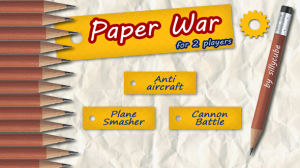
2. Paper war for 2 Player

Paper War for 2 player

This is also best game through which you can play with your friend as second player. The most creative part is that in this you have to cut paper and create like handcraft material. It has different version like Anti aircraft plane smasher, cannon battle and you can also play as single against android player. I recommended those people who love creative game. It comes with decent sound and cool visual UI

Download Paper War

3. Glow Hockey

Glow Hockey

Now this game is simple hockey game but it is hard to win this game level. You have to play against your device to make 7 goals to win this game. The game is strategic and gives quick refreshment. Sounds effect are good and it graphics give like 3D experience.

Download Glow Hockey
4. Paper Toss

Paper Toss

This is one of the block buster games on iPhone and it is available for Android operating system. It is Best Android game of 2011. Highly addictive, good level and location, Great visuals. Highly recommended game.

Download Paper Toss

5. Fruit Slice

Fruit Slice

This is one of good game of 2011 launched game category. Its similar game is fruit ninja and it’s free so what else you want. There are four different games inside this –Classic, Pipeline, Time & one shot. It has best sound effect and visually attractive game. In this game simply slices a fruits.

Download Fruit Slice

6. Gun Bros

Gun Bros

This is the one of the action game with really high on graphics game play and sound effect. It is also added in the face book through which you can play by login in to face book and add this game in your page. It is highly addictive and high action game and also you come across breathtaking action scenes considering you are using as Android smart phones.

Download Gun Bros

7. Zenonia 3 Free

Zenonia 3 Free

This one is another favorite game of people in 2011 as action game. If you like animation games and their interesting stories they have then this game is highly recommended for you. Some of you don’t like it because it is time consuming stories but it give really get into the action of this game. Great action, innovative villains and training is given in the game itself.

Download Zenonia 3
8. iRunner

iRunner is my another favorite android game of 2011,as it keep on running and you have to jump. You have to complete certain task and go to forward at gradual place. It is interesting to the next level. Decent music and great gaming graphics.

Download iRunner

How to extend iPhone 3Gs Battery Life

iPhone 4G
There are more things that you have to do with iPhone like Watch movies, listen to Songs, Check mails, See the document or Pdf file also use Wi-Fi internet. These all things consume more battery. Thus there are requiring continuously charging our phone. Don’t tense about this if you have to face this problem then her I will give you tips that can make your iPhone battery last longer.

iPhone battery
Steps for Extend Battery life:

1. Keeping off the Push Services
Push Email and other services that use push notification that consumed more power and decrease battery life. Push service are always connected to the internets and this require good battery usage, thus reduces the battery life. Thus use internet and other push services whenever required.

How to turn Push Service off:
Keep following service are off :- Wi-Fi, 3G, Push notification, Bluetooth and Location services.

2. Low network coverage area:
When you are in the low network area or very less network signal area, then it is better to keep your phone in Airplane Mode so as to avoid unnecessarily find the signal, so it consume less battery power.

3. Run the latest software update:
It is true that if your OS is updated then it consume less battery.

4. Screen Brightness:
If the brightness of screen maximum then it consumed more battery so keep it less whenever not required.

5. Background Services:
Try to keep all the services off when not in use to avoid unnecessary battery waste.

6. Take Care:
Keep your phone away from heat, sunlight and other things that can affect the battery like magnetic field.

Friday, 9 September 2011

Samsung Galaxy Tab 10.1 4G

While Samsung Galaxy Tab 10.1 has been launched in a few days, it has 4G connectivity and it is available in the north area.


You want to know about the feature of Samsung Galaxy Tab then it is Here

1. 10.1 inch 1280x800 display
2. 1 GHz Tegra 2 dual core processor
3. 1 GB RAM
4. 16 or 32 GB internal Storage
5. Android 3.1 operating System

The Samsung Galaxy Tab 10.1 is available in Bell, Rogers, Telus, Virgin Mobile and Sasktel.Samsung Galaxy Tab 10.1 4G is now available in Canada and it is coming soon in India.Premium Android Honeycomb tablet with Ultra-slim, Light Weight Design, Brilliant 10- inch Touch Screen and Lighting fast Internet Access.

Paul Brannon, Vice president of Samsung Mobile Canada has told that the leader in the Android tablet market, Samsung is committed to providing a variety of feature, always on device. It is a valuable addition to our expanding portfolio of smart portable device. It has large 10.1 inch screen and dual surround sound speakers, it enables user to enjoy multimedia to the maximum extent without having to   compromise mobility.

Samsung is providing the perfect way to enjoy the huge variety of opportunities the Android platform provides. Whether playing games, reading eBooks or updating your Face book status, the light weight, ultra slim Samsung Galaxy Tab is the ultimate entertainer and builds on the industry wide success of Samsung Galaxy Tab.

The Ultimate Entertainment Experience

A 10.1” display with crystal clear resolution 1280x800 makes the Samsung Galaxy Tab an unrivalled device for experiencing the thousand of games and application available from Android Market. To compliment the amazing visual quality of the device, the Samsung Galaxy Tab 10.1 includes dual surround Speaker to immerse you even more fully.

Monday, 5 September 2011

Reset Your Mobile Memory Card Password

We usually set password for our memory card for security and privacy, but our mind is not very sharp and we forget our password. If you forgot your password than only one thing is happened to format your memory card through card reader and you lost your data. Here is the trick which breaks the security wall. If you are symbian user than don’t worry about the password. You can crack them in a few minutes.

In this I have to say you that how to reset your memory card. Before this you have to require X-plore software that shows your system file and hidden folder in your device.

1. Install X-plore in your mobile. Download X-plore

2. Open your X-plore apps and press 0 and check which you have marked the “Show the System files”